PostgreSQL Performance Tuning
Overview
PokerTracker 4 uses the PostgreSQL database server to store your hand, in addition to information and various statistics about the hands you have played. All databases are extremely file intensive because data is constantly being written and read from your hard drive. Hard drives are very slow compared to the speed of all modern day computer processors, hard drives are therefore the number one cause of speed issues when accessing your data stored on the PostgreSQL Server with PokerTracker 4.
With proper configuration, PokerTracker 4 can minimize the number of times PostgreSQL is required to read from your hard drive by storing pieces of your database into Random Access Memory (RAM), this is much faster than the speed of your hard drive. By default, PostgreSQL is configured to use a very small amount of memory which is far from optimum. This tutorial will tweak the PostgreSQL configurations so that more memory is used by the database server and in turn PokerTracker 4's performance will be improved. This will affect all of your databases.
Hardware improvements usually result in the best possible database performance improvements, please consult the PokerTracker Recommended Hardware FAQ for additional information.
Database tuning is not available in the macOS version of PokerTracker 4 at this time.
Tuning Your PostgreSQL Database Server
PokerTracker 4 can automatically tune your PostgreSQL database server to take advantage of your computer's available RAM.
-
Click Database > Database Maintenance
-
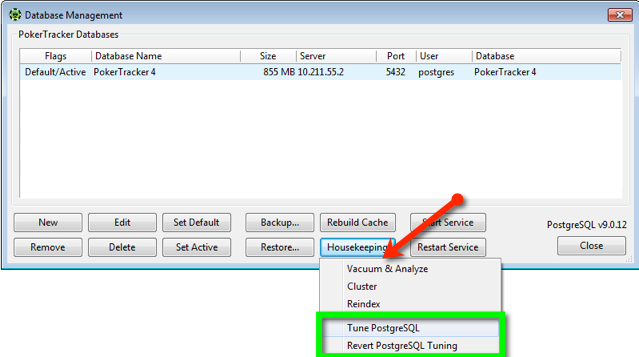
Click Housekeeping, and select Tune PostgreSQL.
A window will appear which notifies the user that Tuning is in progress.
-
Tuning will take effect the next time that the PostgreSQL server is restarted…
Tuning will take effect the next time that the PostgreSQL server is restarted, either due to a computer restart or when the Restart Service button is clicked inside of the Database Management window.
Revert PostgreSQL Tuning
If necessary, you can revert the PostgreSQL database tuning to return to the settings originally found by PokerTracker 4.
-
Click
Database > Database Maintenance
-
Click Housekeeping, and select Revert PostgreSQL Tuning.
A window will appear which notifies the user that the database server is reverting to the prior configuration.
-
The tuning will be removed the next time that the PostgreSQL server is…
The tuning will be removed the next time that the PostgreSQL server is restarted, either due to a computer restart or when the Restart Service button is clicked inside of the Database Management window.