Ignition Hand Grabber Guide
Overview
The Ignition Hand Grabber App generates hand history files as you play at Ignition, Bovada or Ozoon Poker, so PokerTracker 4 can import your hands in real time.
For help configuring Ignition imports in PokerTracker 4 please read this guide.
Registering for the App
To register for the Ignition Hand Grabber App visit this page.
You will need your license information which you can access via Help > About PokerTracker in the PT4 menu.
Automated Setup
Once you are registered, launch PT4 (restart if it's already running) and the app will be downloaded and installed automatically.
The App will launch automatically when you start PT4, run in the background, and generate hand histories as long as PT4 is open.
Order of operations
For hands to be grabbed and imported correctly, follow these steps in order:
- Start PT4 — the Hand Grabber App launches with it.
- On the Play Poker page, click Get Hands While Playing.
- Only then open your Ignition tables.
Notes:
- The App can only grab hands from the installed Ignition software. Playing in a web browser is not supported.
- Tables opened before the App is running will not be grabbed correctly, so always confirm PT4 is open first.
Configuring Ignition in PT4
See the Ignition Configuration Guide for more information.
When the app is installed the hand history folder will be detected automatically.
To enable import of Ignition hands in PT4 go to Configure > Sites & Import Options > Ignition and turn on the Get Hands From Site While Playing option.
To start the import go to the Play Poker page and click Get Hands While Playing.
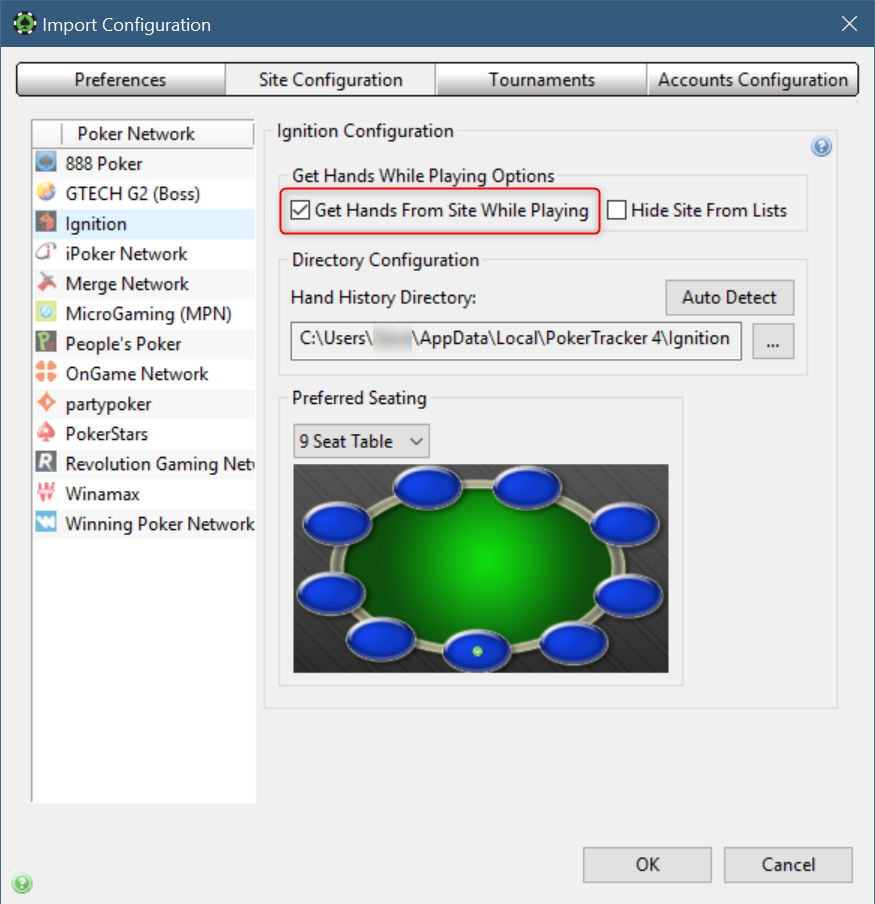
If you use preferred seating in your Ignition software then select the appropriate table sizes in turn, and select the same seat that you use in the Ignition software.
Status Window
Most of the time you do not need to interact with the App directly, but a menu is added to the PokerTracker Apps menu to allow interaction.
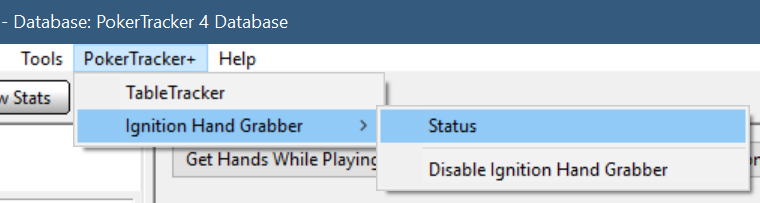
Here you can open the Status window to see whether the App is connected to an Ignition skin, which tables hands are being generated for, and where the hand histories are being written to, as well as the current version of the App.
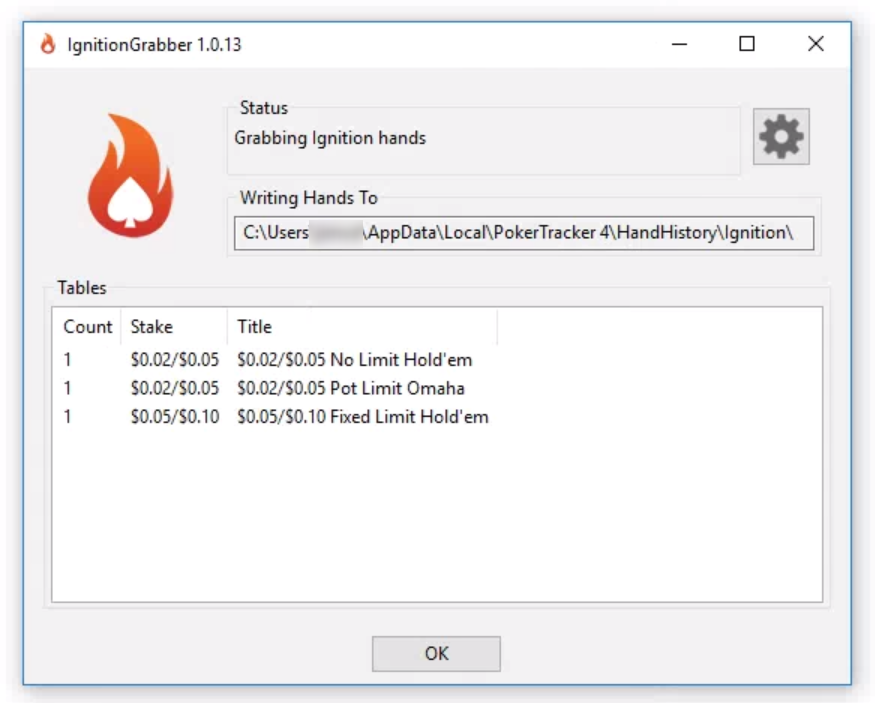
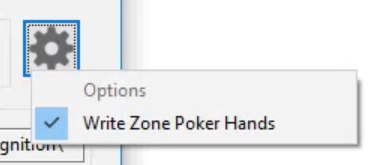
There is also an options button here (the cog) to allow you to enable grabbing of Zone (fast fold) hands. See the Zone Poker section of this guide for information on Zone hand generation.
Zone Poker
Recommendation: Leave Zone hand grabbing disabled (the default) and instead import the complete hand histories you can download from the Ignition client after 24 hours. The downloaded files contain far better data than hands grabbed during fast-fold play.
Why grabbing Zone hands is limited:
- Grabbing during play can only generate partial hand histories, up to the point at which you fold. This gives correct win/loss results for hero in most hands†, but hero's other stats and villains' data will not be correct in hands where you fast-fold.
- Because the players are anonymous and change every hand, the HUD cannot be shown even if hands are importing as you play.
† If you are in the big blind and fast-fold before anyone bets, this is treated as a win for you: the fold only takes effect if someone bets, so if it folds to you, you still win. Without that information the correct result can't always be determined.
If you do enable Zone grabbing, you will need to purge the generated sessions before importing the downloaded histories (see Importing Downloaded Hand Histories below). Alternatively, use a dual-database setup to import the downloaded hands into a separate database for review.
If you want to enable grabbing of Zone hands as you play you can do so via the Options (gear) button on the Status window.
Enabling and Disabling the App
If you want to temporarily disable the Ignition Hand Grabber App you can do that using the PokerTracker+ menu.
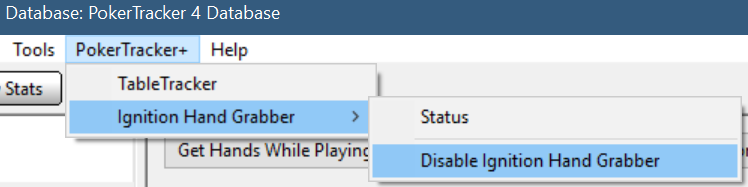
When an App is disabled it is stopped, and will not be run again until it is re-enabled.

Create Support Bundle
If requested by support you can create a support bundle of all the relevant log files and hand histories via the Ignition Hand Grabber's Status window.
These are the files for the current instance of PokerTracker 4 and the Ignition Hand Grabber, so be sure to reproduce the problem you are having and create the support bundle before you restart.
To do this, first open the Status window: go to PokerTracker Apps > Ignition Hand Grabber > Status.
Now click the gear icon and choose Create Support Bundle.
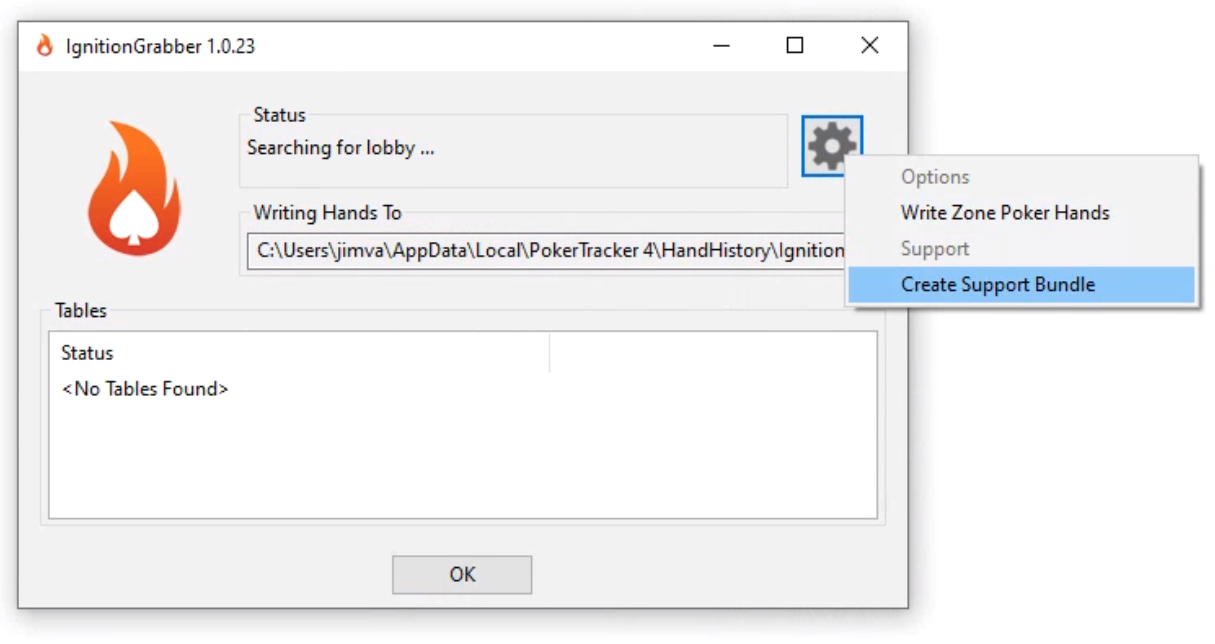
Choose a location to save it to and note where that is. The default is your Documents folder.
If you already have a support ticket open attach the file to that ticket. If not, create a Support Ticket and attach the file.
Limitations
- English only. The Ignition (or Bovada/Ozoon) software must be running in English for the Hand Grabber to work. Change the language using the dropdown at the top of the lobby window.
- Tables must be opened after the App is running. Hands from tables opened before PT4 is up won't be grabbed correctly — see Order of operations.
- Player names are anonymous. Ignition hides real names, so PT4 generates a unique name for each player, updated as players leave and join. You appear as "Hero"; opponents get long "random" names prefixed by their seat number (seat 1 → "P1-", and so on).
- Grabbed and downloaded hands often show different opponent names. The names are derived from the hands observed before you sit in, so the extra hole-card information in downloaded histories can't be merged once grabbed hands are already in the database. The workaround is to import downloaded hands into a separate database, though that data is of limited value — you won't know when you face those players again.
- Not available on macOS.
- No HUD at Zone tables, since every hand has different anonymous players. Zone grabbing is disabled by default; see Zone Poker.
Security Software and the Ignition Hand Grabber
It is possible for security software to prevent the Ignition Hand Grabber from working and generating hands. If the Ignition Hand Grabber 'Status' window reports any errors or does not detect your Ignition/Bovada/Ozoon poker software when it is running please try adding an exception for the PokerTracker 4 application. By default this is installed to:
C:\Program Files (x86)\PokerTracker 4\PokerTracker4.exe
Windows Ransomware Protection
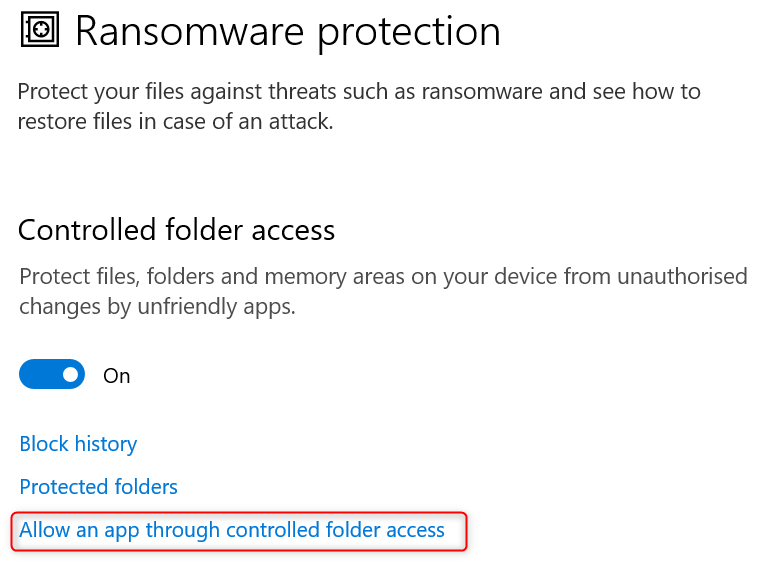
Windows 10 security has an option for Ransomware Protection (also known as Controlled Folder Access), and this can interfere with the Ignition Hand Grabber.
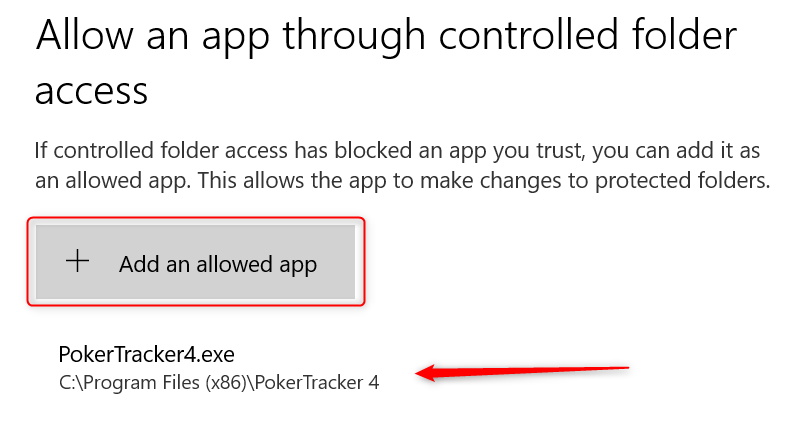
If you have Ransomware Protection enabled on your PC you will need to add PokerTracker 4 to the list of allowed applications, as described in this Microsoft guide.
Importing Downloaded Hand Histories
Key point: If you have already imported hands in real time with the Hand Grabber, you must purge those sessions before importing the same hands from a downloaded file. Otherwise the two sets of hands won't match and your data won't be updated.
Why the hands don't match: The Hand Grabber generates a unique anonymous name for each player, based on the time of the first hand it sees. With grabbed hands, that first hand usually happens before you sit down to play. Downloaded hands, however, only begin when you start playing, so PokerTracker can't recreate the same anonymous names. Because the names don't line up, it can't match the two sets of hands or update the existing data.
To purge and reimport:
- In PT4, go to File > Database > Purge Hands.
- Locate and select the sessions you want to purge, then click Purge Sessions.
- Import the downloaded hands via Play Poker > Get Hands From Disk.
Alternatively, import the downloaded hands into a separate database for analysis via Database > Database Management, leaving your real-time data untouched.
Notes
- During February 2026, Bodog Poker rebranded as Ozoon Poker