Database Caching Guide
Overview
A Database Cache is a table of pre-calculated information used to improve database performance by storing and retrieving calculated data in a high-performance repository. Think of a database as a series of spreadsheet tables tied together by reference points: the more data each table holds, the longer it takes to calculate results. Rather than re-calculate across multiple tables on demand for every query, the cache stores pre-calculated results so the database server can respond quickly.
In PokerTracker 4 the cache speeds up reports and graphs, but its benefit is most obvious in the HUD. Cached and uncached queries are managed separately, so a stat that uses uncached columns is calculated on the fly and its HUD update is delayed as new hands are imported — the cached HUD stats still appear separately as soon as they're available.
Reports and graphs, however, are not loaded in separate stages, so a single uncached stat slows the loading time of the entire report or graph.
Rebuilding the Database Cache
Occasionally the database cache becomes outdated, which can cause HUD issues. Rebuilding the cache should resolve the problem.
Rebuild the cache for the active database
- In PT4, open File > Database > Database Management.
- Click Rebuild Cache.
- Choose Full Cache Rebuild.
The rebuild may take some time, depending on the size of your database and the performance of your computer.
Rebuilding other databases
The cache is stored separately for each database, and a rebuild only affects the currently active database. To rebuild the cache for another database, set it as the active database and repeat the steps above.
Repeat this for each database individually — there is no way to rebuild all caches at once.
Stats and Columns
A stat is a mathematical calculation of data drawn from PokerTracker 4 columns. Most cached stats divide the database column counting how often an action was taken by the column counting the opportunities for that action.
The word "Column" is used in two related ways. PokerTracker 4 Columns live on the Columns page in the Statistics Configuration window. Database Columns are part of the database itself and are only created once a stat is cached.
Databases are made of tables, and tables are made of database columns — much like the spreadsheet analogy above. Stats are PokerTracker 4 "objects" that don't exist in the database; they are built from PokerTracker 4 Columns, which lets multiple stats share the same building blocks without those blocks being stored in the database. When you enable the cache for a custom column, the Database Cache creates a matching Database Column.
PokerTracker 4’s Database Cache
Take the 3Bet Preflop stat as an example. It divides the number of times a player 3Bet (stored in the column cnt_p_3bet) by the number of opportunities they had to 3Bet (stored in cnt_p_3bet_opp), then multiplies by 100 to display the result as a percentage.
(cnt_p_3bet / cnt_p_3bet_opp) * 100 = 3Bet Preflop %
Both cnt_p_3bet and cnt_p_3bet_opp are cached, allowing PostgreSQL to pre-calculate them so the stat appears in the HUD almost instantly.
Most columns used by default built-in stats are cached. The exception is stats that require post-processing: By Time stats such as Real Hours (commonly used in reports grouped By Date) are not cached.
Custom stats that use default columns are typically cached. Custom stats that rely on custom columns, however, could not be cached before PokerTracker 4.11 — the first version that allowed custom PokerTracker 4 columns to be cached. On 4.11 and later, HUD and report performance is faster for users who add home-made custom stats or free stats from the PokerTracker Download Warehouse, as well as users of third-party Premium HUDs such as CoffeeHUD and ProPokerHUD.
Consider the Delayed (Turn) CBet stat from the Download Warehouse:
(cnt_t_delayed_cbet / cnt_t_delayed_cbet_opp) * 100
This stat uses two custom columns: cnt_t_delayed_cbet (how often the player delayed their CBet until the Turn) and cnt_t_delayed_cbet_opp (the opportunities they had to do so). Neither exists in the default database schema, so both are uncached in PokerTracker 4.10.9 and earlier — but cached if the stat is imported into 4.11 or later.
To verify whether a column is cached, go to Configure > Statistics, choose Cash Games or Tournaments, then Players or Hands, and select Columns. Find the column and confirm the Cache checkbox is selected.
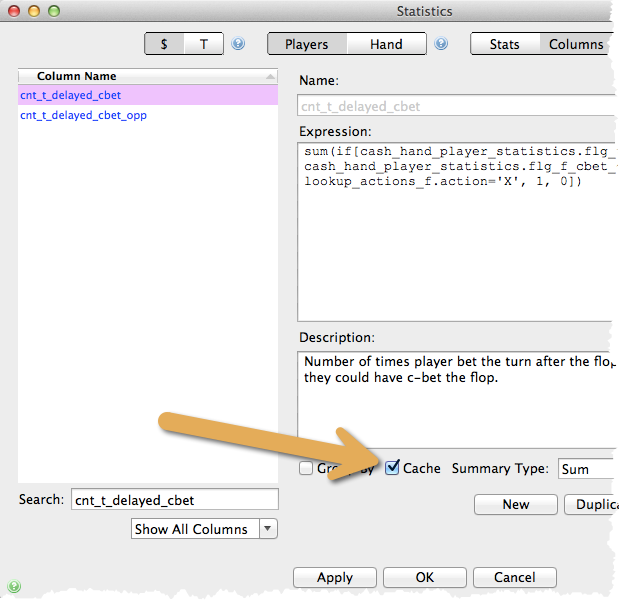
When importing a custom stat, PokerTracker 4 enables the cache for every column that can be cached. Developers defining new columns, however, must enable the Cache checkbox manually on their own computer.
When a Column Cannot Be Cached
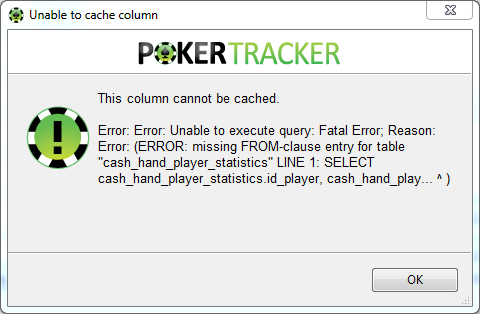
Not every column can be cached. PokerTracker 4 reviews every imported custom stat and automatically enables the cache when a column is cacheable. If you create a custom stat with a column that cannot be cached, an error message appears stating that the stat is not cacheable.
There is no user-facing notice when a column simply isn't cacheable — the error message below is intended for custom stat developers. Casual importers of pre-defined custom stats rely on the developer, who is responsible for caching decisions.
Cache Exceptions
The following expression types cannot be cached.
1. Subqueries. For example:
exists (select 1 from cash_hand_player_statistics chps where chps.flg_hero and chps.id_hand = cash_hand_player_statistics.id_hand)
A subquery ties columns across different tables together. If it were cached, updating that column would re-read most of the database for every player at the end of every hand — too slow to use in-game. Even if a subquery took only 1ms per player, a 100-player database would add 100ms per hand during import (acceptable), but a 10,000-player database would add 10 seconds per hand (unacceptable).
Columns containing subqueries are still permitted, but expect any stat that needs one to perform as poorly as it did before 4.11.
2–5. Table references without cash_hand_player_statistics. A reference to any of the following can only be cached if the expression also references cash_hand_player_statistics:
- cash_hand_summary
- cash_hand_player_combinations
- cash_limit
- cash_table_session_summary
PokerTracker 4 must be able to break cacheable stats down by absolute position, in/out of position for post-flop stats, by stake, and by date. Without an explicit cash_hand_player_statistics reference, that table cannot be joined — and that join is what supplies the position, stake, and date details.
This expression can be cached, because it references both cash_hand_summary and cash_hand_player_statistics:
sum(if[cash_hand_player_statistics.flg_f_saw and cash_hand_summary.amt_mgr > 0, 1, 0])
This expression cannot be cached, because it references cash_hand_summary without the necessary cash_hand_player_statistics:
sum(if[cash_hand_summary.amt_mgr > 0, 1, 0])
6. References to lookup_positions. This lookup table cannot be used in the custom cache; test cash_hand_player_statistics.position directly instead. This takes a little extra work to build EP and MP positions, but it is necessary for the stats to work correctly. Other lookup tables are fine — most notably lookup_actions_p, lookup_actions_f, lookup_actions_t, and lookup_actions_r.
7. Tournament result stats such as ROI and ITM, because only hand-based columns can be cached.
8. "Group By" stats — stats used only to break reports into multiple rows. They are designed for reports, not for HUDs.