Database Housekeeping
Introduction
As you import new hands and your database grows, performance can degrade. If importing has slowed down or reports load slower than they once did, it's time to perform a full database housekeeping to restore peak performance.
How to Perform a Full Housekeeping
In PokerTracker, go to Database > Database Management, click Housekeeping, and run the following in this order:
- Tune PostgreSQL — Windows only, and only needs to be completed once. If this step fails, skip to step 2.
- Reindex
- Cluster
- Vacuum/Analyze
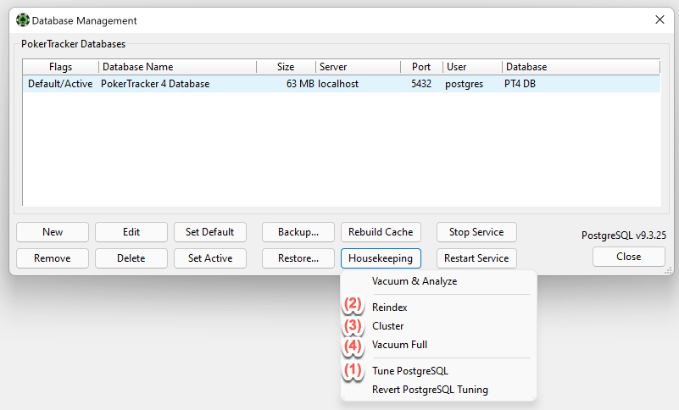
Housekeeping only runs on the active database. To perform housekeeping on another database, select it, click Set Active, then re-run steps 2–4.
Post Housekeeping
After completing a full housekeeping, run the Setup Assistant to import any existing hand histories. In PokerTracker, go to Tools > Setup Assistant and click Next to step through each section. When finished, your existing hand histories will be imported and archived to your Processed Files directory.
Your database and PokerTracker should now be operating at peak efficiency for your computer and database size.