Using LeakTracker
Overview
LeakTracker is a built-in educational tool that compares your key statistics against a large sample of winning players, helping you learn what optimal play looks like for PokerTracker 4's most critical stats.
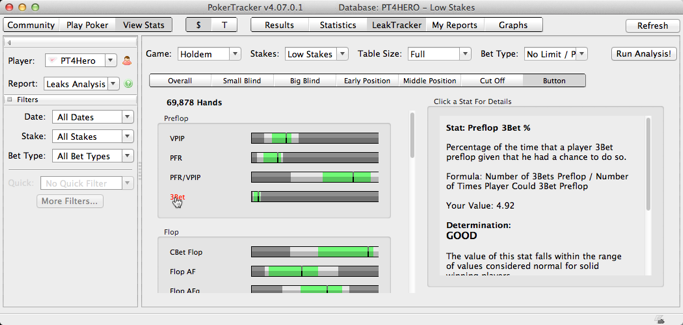
Running a Leaks Analysis
To use LeakTracker:
- Click the LeakTracker button, then select the Leaks Analysis report in the left frame.
- Choose the Game, Stakes, Table Size, and Bet Type you want to review, then click Run.
- LeakTracker compares your stats (or those of the chosen active player) against a large database of winning players. Your results appear as the black line in each stat's horizontal graph. You can compare results by position or view the overall result for each stat.
The colors in each horizontal graph represent the three possible determinations:
- Green = Good
- Light Gray = Needs Improvement
- Dark Gray = Potential Problem

Click the name of any stat to open a guide in the right frame, showing its definition, formula, and a determination explaining whether your value falls within the range typical of solid winning players.
Watching the Tutorial Videos
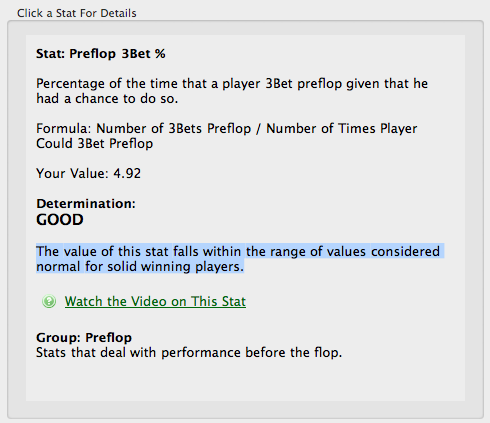
Each stat reviewed by LeakTracker has a short tutorial video showing how it correlates with other critical stats and the optimal ranges found in LeakTracker's sample of winning players. Click Watch the Video on This Stat to view it.