Converting from PokerTracker 3
Overview
Users who upgraded to PokerTracker 4 from PokerTracker 3 may want to import PT3 data. Doing so is very simple and can create a more seamless transition to PT4. This guide will review how to import a PT3 database, HUD, and even custom stats.
Importing a PokerTracker 3 Database
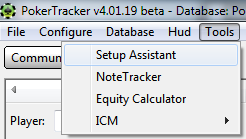
To import a PokerTracker 3 database go to Tools -> Setup Assistant from the main menu.
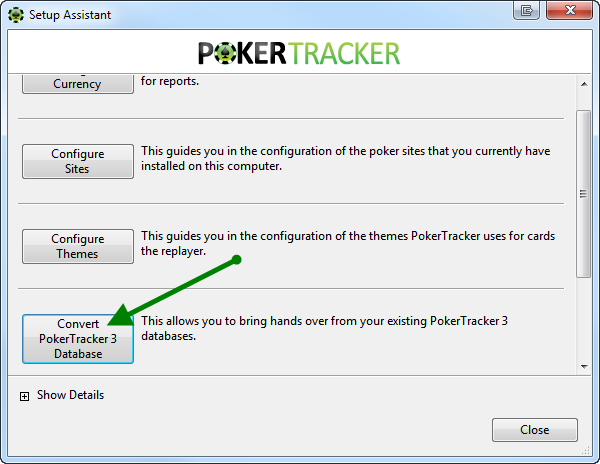
From here, scroll down and select Convert PokerTracker 3 Database.
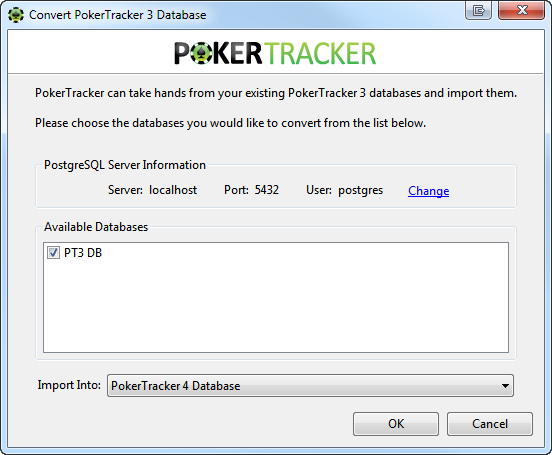
Select the database(s) you wish to import from the Available Databases section. You must also make sure that your PostgreSQL settings are correct. To change them, click the blue Change link. Lastly, select which PokerTracker 4 database you would like the PT3 hands imported into. Once you've made all of your selections, click OK.
For bigger databases this process can take a considerable amount of time. Please allow PokerTracker to finish for optimal results.

Importing a PokerTracker 3 HUD
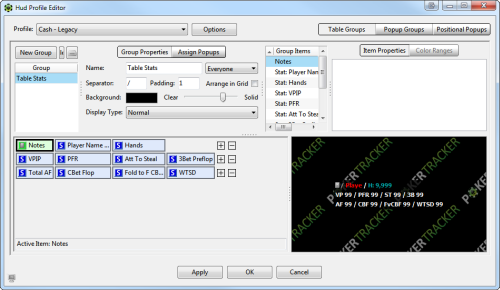
To import a PT3 HUD go to HUD -> Edit HUD Profiles. When the HUD Profile Editor comes up, go to Options and then Import Profile.
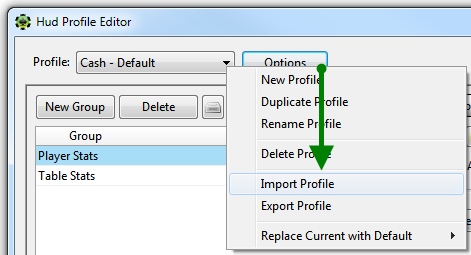
Once imported, you can edit the HUD in any way you like. Click OK to save your changes.
PokerTracker 3 HUD Suggestion
Some users will encounter issues when trying to import a PokerTracker 3 HUD with custom stats. This is primarily due to the exact custom stat's definition not being present in PT4. One option is to import the custom statistic into PokerTracker 4, which is discussed later in this guide.
At this time, PokerTracker suggests that you either use one of the built-in PT4 HUDs, or rebuild your PT3 HUD in PT4. The built-in HUDs are very powerful and provide numerous ways to display statistics. And rebuilding/customizing HUDs in PokerTracker 4 is very simple and intuitive. For more information on customizing a PT4 HUD, click here.
Importing Custom PokerTracker 3 Statistics
To import your PT3 custom statistics into PT4 go to Configure -> Statistics. From here, go to Options and then Import.
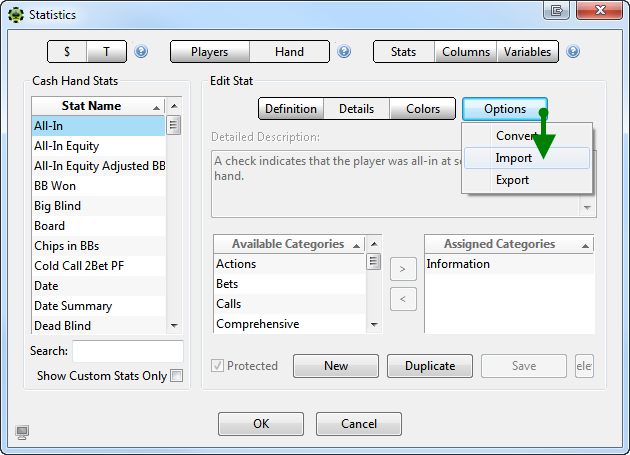
Once you imported your statistic(s), click OK to save your changes.
PokerTracker 3 Stats Suggestion
Before importing your custom PokerTracker 3 statistics we suggest you look through PT4 statistics first. PokerTracker 4 spent lots of time creating the stats that players want and need, and it's very likely that a custom stat you created in PT3 comes standard in PT4.
Statistic Differences
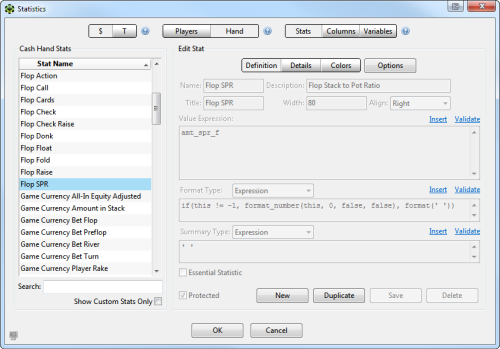
Some statistics have been added, removed, or modified between PokerTracker 3 and 4. This section will list the PokerTracker 3 statistic, PokerTracker 4 statistic, and any important notes.
| PT3 Stat Name | PT 4 Stat Name | Important Notes |
| $/100 | My Currency Per 100 Hands | There is also a game currency version, but for HUD usage we must use My Currency stats. |
| $/Day | My Currency Per Day | There is also a game currency version, but for HUD usage we must use My Currency stats. |
| $/Hand | My Currency Per Hand | There is also a game currency version, but for HUD usage we must use My Currency stats. |
| 3Bet Preflop And Fold to 4Bet | Fold to PF 4Bet After 3Bet | |
| 4Bet Preflop | 4Bet+ Preflop | We do have a 4Bet Preflop in PT4, it's just a different stat (exactly 4bet, rather than 4bet or higher as the PT3 stat worked). |
| 4Bet River | 4Bet+ River | |
| 4Bet Total | 4Bet+ Total | |
| 4Bet Turn | 4Bet+ Turn | |
| Amount Blind | My Currency Blind | There is also a game currency version, but for HUD usage we must use My Currency stats. |
| Amount Won | My Currency Won | There is also a game currency version, but for HUD usage we must use My Currency stats. |
| Amount Won (Global) | My Currency Won | |
| Amount Won (Native) | Cannot be used in HUD. | |
| BB v SB Steal - Call | BB v SB Open - Call | |
| BB v SB Steal - Fold | BB v SB Open - Fold | |
| BB v SB Steal - Raise | BB v SB Open - 3Bet | |
| Call F CBet in 3Bet Pot | Call F CBet in 3Bet+ Pot | |
| Call F Check/Raise | Call F Check Raise | |
| Call F Float | Call F Float Bet | |
| Call PFR | Call Any PF Raise | |
| Call R Check/Raise | Call R Check Raise | |
| Call T Check/Raise | Call T Check Raise | |
| Cbet Success Percentage | CBet Flop Success | |
| CCPF | Cold Call 2Bet PF | |
| Fold BB to SB Steal | BB v SB Open - Fold | |
| Fold F Cbet in 3Bet Pot | Fold to F CBet in 3Bet+ Pot | |
| Fold Steal to Blind Reraise | Fold to PF 3Bet After Steal | |
| Fold to F Check/Raise | Fold to F Check Raise | |
| Fold to Flop Float Bet | Fold to F Float Bet | |
| Fold to PF 3Bet When Raised | Fold to PF 3Bet After Raise | |
| Fold to R Check/Raise | Fold to R Check Raise | |
| Fold to Raise after F Cbet | Fold to Raise After F CBet | |
| Fold to Raise after R Cbet | Fold to Raise After R CBet | |
| Fold to Raise after T Cbet | Fold to Raise After T CBet | |
| Fold to T Check/Raise | Fold to T Check Raise | |
| HoleCards | Hole Cards | |
| Limit | Stake | |
| LWPC | Limp With Previous Limpers | |
| MGR | My Currency Rake Share | There is also a game currency version, but for HUD usage we must use My Currency stats. |
| Preflop Squeeze Def Call | Call PF Squeeze | |
| Preflop Squeeze Def Fold | Fold to PF Squeeze | |
| Preflop Squeeze Def Raise | Raise PF Squeeze | |
| Raise 3Bet | 4Bet+ Total | |
| Raise 4Bet | 4Bet+ Total | |
| Raise F 3Bet | 4Bet+ Flop | |
| Raise F 4Bet | 4Bet+ Flop | |
| Raise F Bet | 2Bet Flop | |
| Raise F CBet in 3Bet Pot | Raise F CBet in 3Bet+ Pot | |
| Raise F Check/Raise | 3Bet F Check Raise | |
| Raise F Float | Raise F Float Bet |
| Raise PF 3Bet | 4Bet Preflop | |
| Raise PF 4Bet | 5Bet+ Preflop | |
| Raise R 4Bet | 4Bet+ River | |
| Raise R Bet | 2Bet River | |
| Raise R Check/Raise | 3Bet R Check Raise | |
| Raise T 4Bet | 4Bet+ Turn | |
| Raise T Bet | 2Bet Turn | |
| Raise T Check/Raise | 3Bet T Check Raise | |
| Raise vs Steal Att | 3Bet Steal | |
| Rake | My Currency Rake Attributed | There is also a game currency version, but for HUD usage we must use My Currency stats. |
| RFI | Raise First In | |
| RWPC | Raise With Previous Limpers | |
| Saw River % | Saw River Percentage | |
| Saw Turn % | Saw Turn Percentage | |
| Table - Average Stack | Live Avg Stack | |
| VP$IP | VPIP | |
| W$SD | WSD | |
| W$WSF | WWSF | |
| Without Blind | My Currency Won w/o Blind | There is also a game currency version, but for HUD usage we must use My Currency stats. |